How We Achieved Sustainable SharePoint Adoption at Visa

Background
In 2012, Visa, a financial services company with about 20,000 employees, had deployed two on-prem SharePoint farms with about 350 site collections and 100 unique site owners. However, enthusiasm for the platform was low and adoption was stagnant.Challenge
Governance was a key challenge for Visa. Simplified governance policies were necessary, and user adoption would be tied to how well those policies were deployed—and ultimately accepted by users—across the platform. Early on, the IT team's approach reflected a "What’s in it for me?" perspective. The me in this case was the SharePoint user. According to former lead software engineer Eric Eaton, "When crafting governance policies for SharePoint usage, it’s easy to focus on central control and convenience for the SharePoint team–and minimize the functional needs of the users. We realized that every governance decision we made had a direct effect on user adoption – for better or for worse. We decided that if we wanted adoption to grow, we had to prioritize the voice of the user." The central goal for the team was strategic simplicity – for their admins, but primarily for the users. According to Eaton, every decision made, every solution built, every service provided was conceived through the lens of "does this make life simpler or harder for our users?". So they set out to provide the help that users needed. Their first attempt was to set up half-day training classes on various SharePoint topics. While moderately successful, the classes did not produce the result that Eaton and his team expected. "Many users had difficulty with that learning format", he said. "It was hard to be away from their desk that long, and they struggled to retain the information long enough to affect parts of their daily work where it could help. Those classes started growth in productivity and user adoption but didn’t have a lasting effect because we didn’t reach enough users to have a lasting effect."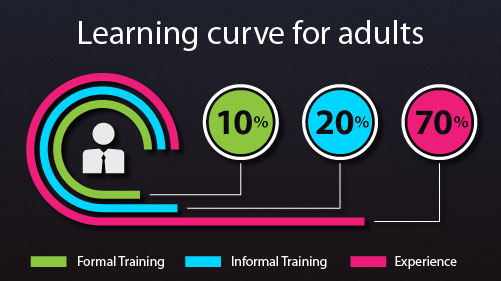
Solution
It was clear that traditional training modalities did not produce the desired results. So they installed VisualSP, a plug-and-play add-on application to SharePoint Online and on-prem installations. The VisualSP Help tab appeared in the ribbon on every page in SharePoint, ready to give relevant guidance within the users’ own sites and natural flow of work. Each help item on the tab was brief and focused on one user task. Many were in a video format, while others appeared as web pages, rich text, or documents that were easily printable for quick reference. This allowed employees to use SharePoint without prior knowledge of the application and without the time-consuming, frustrating process of contacting the IT support team or searching the web for answers. They steered users toward this resource whenever they reached out with common how-to questions. In addition, the product’s content customization capabilities allowed Eaton’s team to easily build its own help items into the system, pushing common resources and answers to users that were more specific to the Visa environment—all within the context of where they might need it. This helped remove the need for users to go looking for relevant governance, support, and process help. They also added other help items that were targeted to site owners, clarifying governance guidelines, documenting details of custom solutions, and easily linking users to resources such as a new site request form. They found ways to reduce how many types of tickets were used and subsequently added a button to the Help tab that directly opened the correct ticket within a dialog box.
Over time, Eaton’s team began to track key indicators that helped him and his colleagues to see the type and depth of adoption in their sites. They stopped providing the in-class user training and started “office hours” support to recover man-hours that would have been lost to traditional communication methods, such as email, phone, and support tickets.
They found ways to reduce how many types of tickets were used and subsequently added a button to the Help tab that directly opened the correct ticket within a dialog box.
Over time, Eaton’s team began to track key indicators that helped him and his colleagues to see the type and depth of adoption in their sites. They stopped providing the in-class user training and started “office hours” support to recover man-hours that would have been lost to traditional communication methods, such as email, phone, and support tickets.
Results
By enacting a focused user adoption program, the company saw an additional 451% growth in the number of site collections (1,810) and 178% lift in the number of unique site owners (236) over a four-and-a-half-year period. Over 2,700 no-code customizations, such as forms and workflows, were built during that time. According to Eaton, the ease of implementation and customization were key components to the VisualSP Help System improving support efficiency and user self-support. And the concept of delivering support and training proactively while the user was working in SharePoint was a game-changer. The VisualSP solution simplified both the user experience and the admin workload across the organization.